## Breadcrumb
1. [Home](/)
2. Markdownify
3. Node
4. [Refunds](/markdownify/node/3488)
# Refunds
Explore
- [Overview](/student-services/student-accounts)
- [Payment Plans](/student-services/student-accounts/payment-plans)
- [Refunds](/student-services/student-accounts/refunds)
- [Tuition Fees](/student-services/student-accounts/tuition-fees)
- [How to Pay Tuition](/student-services/student-accounts/how-pay-tuition)
- [Laptop Program Fees](/student-services/student-accounts/laptop-program-fees)
- [Other Fees](/student-services/student-accounts/other-fees)
rgb(0,0,0)
## Refund request form
Review the [Dates and Deadlines page](https://www.ocadu.ca/student-services/office-registrar/dates-and-deadlines) for refund deadline and submit a refund request.
[ Submit request
.arrow-link-long {
fill: #000;
}
](https://ecm.ocadu.ca/Forms/StuRefunds/?SEQ=1D94BC5C1317FACA201B9318D5B54E48)rgba(242,99,35,1)
rgba(0,0,0,1)

rgb(255,255,255)
### About the tuition and fee refund process
**Refunds by program type**
The refund process is different for each program type. Please select from the options below to review key details on refund eligibility, policies and types of fees that may be refundable.
**Important:** Informing faculty or staff does not constitute an official withdrawal of course registration. Students must withdraw or drop courses online through self-service by the refund/withdrawal deadlines. Failure to do so may result in outstanding fees due which the student remains responsible in paying.
### Undergraduate and Graduate Per Credit Program Students
Credit students who withdraw from one or more classes before the refund deadline will have their total tuition recalculated based on their new credit load.
- Review the [Dates and Deadlines page](https://www.ocadu.ca/student-services/office-registrar/dates-and-deadlines) for refund deadlines.
- Students are only eligible for a refund, minus the tuition deposit, if the recalculated tuition amount is lower than the tuition amount paid for that term.
[ Fill out a refund request form
.arrow-link-long {
fill: #000;
}
](https://erpapps.ocadu.ca/ecm_anon_sso/default.aspx?ecmform=StuRefunds)
### Graduate Flat Fee Program Students
Flat-fee graduate students who withdraw from all their classes before the refund deadline will have their total balance owing recalculated or refunded, depending on date of withdrawal. Please remember, if you drop all of your courses, you are effectively dropping out of graduate school.
- Review the [Dates and Deadlines page](https://www.ocadu.ca/student-services/office-registrar/dates-and-deadlines) for refund deadlines.
- Students are only eligible for a refund, minus the tuition deposit, if the recalculated tuition amount is lower than the tuition amount paid for that term
[ Fill out a refund request form
.arrow-link-long {
fill: #000;
}
](https://erpapps.ocadu.ca/ecm_anon_sso/default.aspx?ecmform=StuRefunds)
### Graduating students
Students approved to graduate do not need to submit a request for a refund. OCAD U will issue your refund automatically.
### Continuing Education (Non-Credit) Programs
Continuing Education students are subject to the [School of Continuing Studies Registration Policies](https://continuingstudies.ocadu.ca/contentManagement.do?method=load&code=PG0007).
### All other students
Contact [Student Accounts](mailto:studentaccounts@ocadu.ca "mailto:studentaccounts@ocadu.ca") for further assistance.
rgb(255,255,255)
### How will my refund be paid back to me?
If you are eligible for a refund, the way your refund will be issued to you will depend on whether you’re a domestic or international student.
- Domestic students: the refund will be issued to you via Interac e-Transfer to your @OCADU.ca email address.
- International students: the refund will be issued to you via a bank transfer to the recipient and beneficiary bank account you identify within the PayMyTuition refund form.
OCAD U has partnered with [PayMyTuition](https://www.paymytuition.com/) to remit international and domestic refunds to students. Third-party sponsored students and provincially or federally funded students are excluded from the e-Transfer refund process.
### Processing times
Refunds typically take between **2 to 3 weeks** to process from the time you submit your refund request for processing. Within 2 to 6 business days from the time your refund has been processed, you will receive automated emails confirming your refund and required next steps.
*Refund payments that are not accepted or cancelled by the student will be charged a $7.50 cancellation fee. This fee will be applied to the credit term balance of the student’s finance account.*
### Third-party sponsored students
The refund will be sent directly to the identified third party (for example, Indigenous band, corporate sponsor) by Electronic Fund Transfer (EFT).
### Financial aid (student loan or grant)
The refund will be issued directly to the appropriate provincial or federal government agency.
If you receive financial aid funding and you make changes to your schedule but maintain a full-time status, a credit balance will display on your account. If there’s no outstanding fees, the applicable refund amount will be refunded via Interac e-Transfer to you.
If you were approved for a health and/or dental insurance opt-out for the term, a fee reversal will be credited back to your account and go towards any outstanding fees (if applicable).

rgb(0,0,0)
### Refunds Processed through PayMyTuition
Once your refund has been processed, you will receive an email at your @OCADU.ca account from PayMyTuition with information on your next steps. These next steps will differ for domestic and international students.
rgb(0,0,0)
### Domestic students
#### Accepting your e-Transfer and finding your passcode
### Accepting your e-Transfer
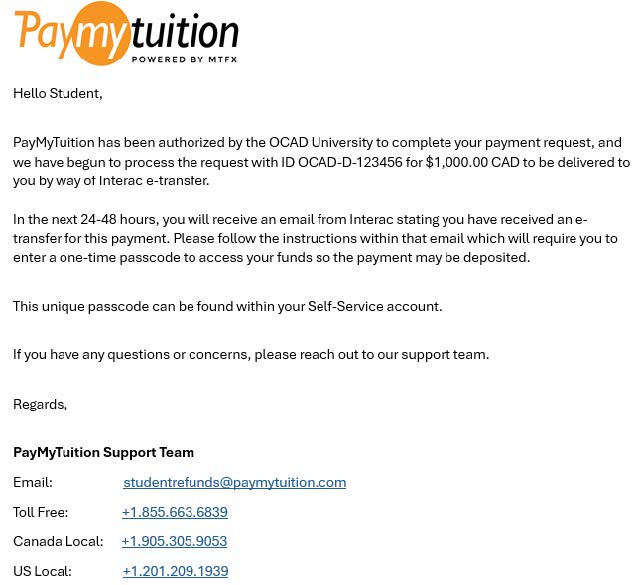
Once your refund has been processed, you will first receive an initial email from OCAD U. Within the next 2 to 6 business days, you can expect these emails:
1. PayMyTuition ([**studentrefunds@paymytuition.com**](mailto:studentrefunds@paymytuition.com)) will email you to inform you that your Interac e-Transfer email will be issued within the next 24 to 48 hours.
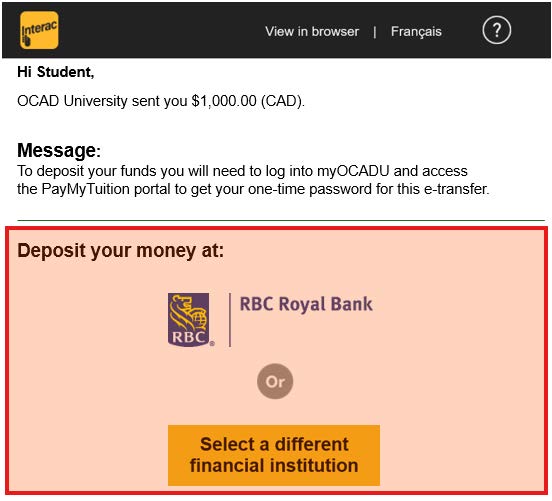
2. You will then receive an Interac e-Transfer email instructing you to sign in to [myOCADU](http://my.ocadu.ca/) to access PayMyTuition, where you can retrieve your one-time passcode. This passcode will allow you to securely access and collect your refund payment.
\*If your email address is registered for **Autodeposits** through your bank, you won't require a one-time passcode to finalize the deposit. Instead, when you select to deposit your funds, you’ll sign into your financial institution and the refund will autodeposit upon sign in.
[ ](https://www.ocadu.ca/sites/default/files/2025-06/OCADU-OneTimePasscodeWalkthrough-ezgif.com-optimize.gif)**Important:** Please complete the e-Transfer process within these 30 days, after which it will expire. If you do not retrieve your passcode and collect your funds prior to the expiration date, your refund will be automatically cancelled and the funds will be returned to your student account. You will be required to submit a new refund request should you want the funds returned to you.
### Finding your passcode in myOCADU
1\. Log into myOCADU.
2\. Go to **Tools** > **Self-Service** > **Student Financials** to access the **PayMyTuition Payment Center**.
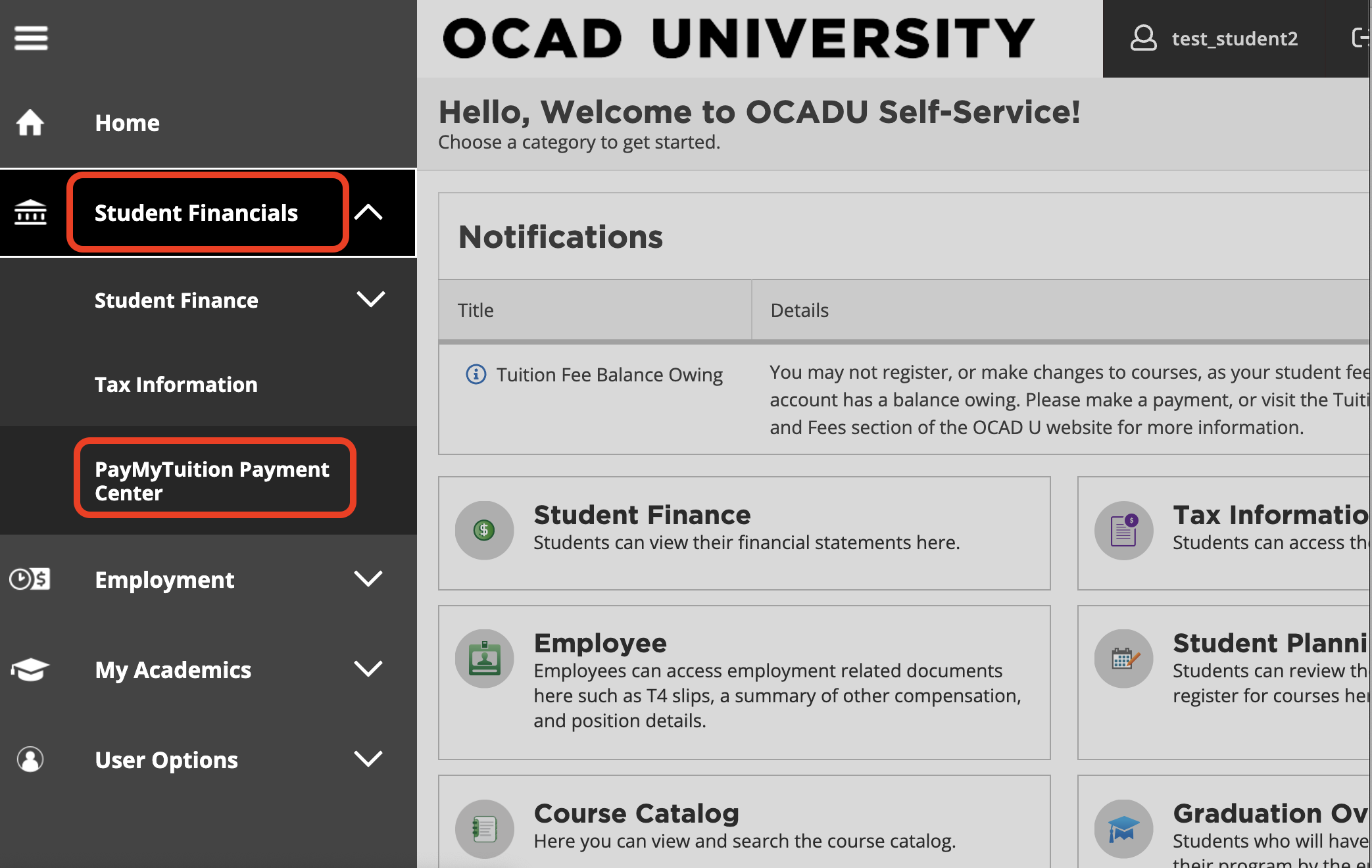
3\. Select your financial institution (bank) location to be redirected to **PayMyTuition**.
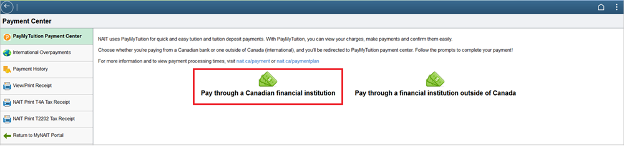
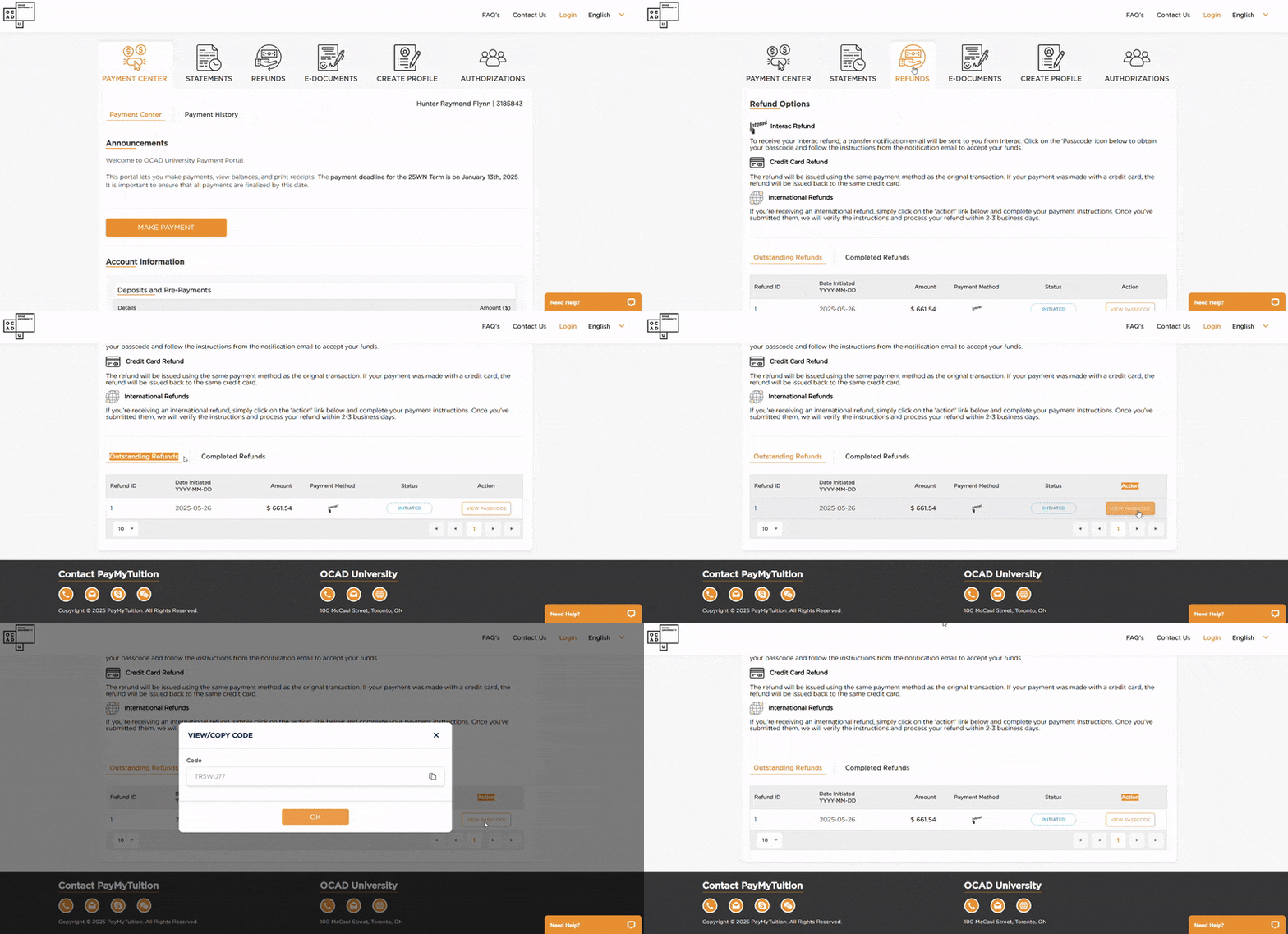
4\. Within the PayMyTuition portal, select the **Refunds** tile.

5\. In the Refunds section, you can access the **Outstanding Refunds** tab and click on the **icon** within the Action column to retrieve your one-time passcode.
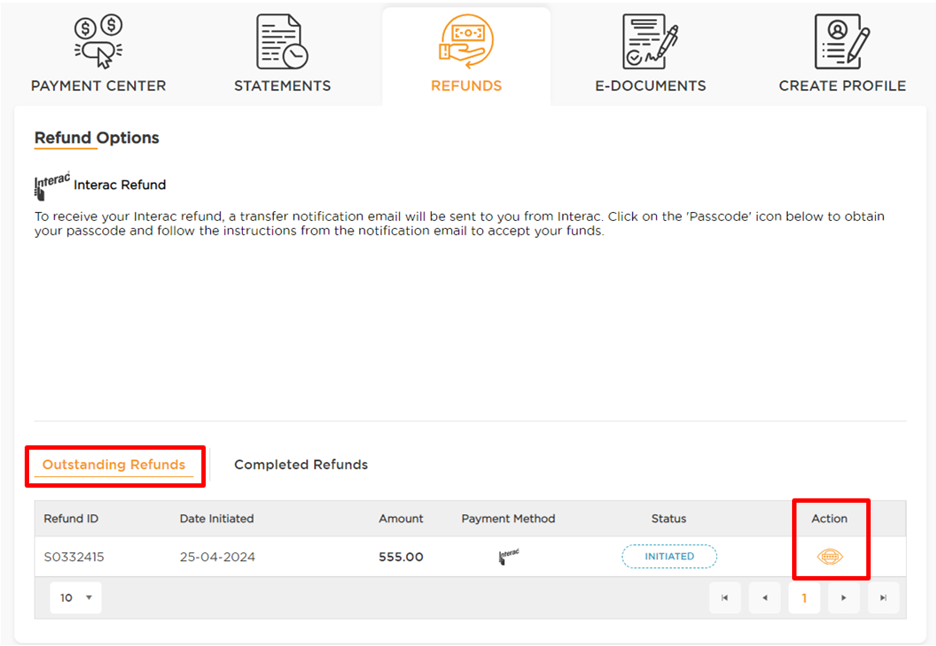
6\. Then return to the Interac e-Transfer email communication to select the **Deposit your Money** button.
- *Is your email is set up for **Autodeposits** with your bank? If so, you won't need a one-time passcode. Just select to deposit your funds, sign in to your bank and the refund will automatically deposit when you sign in.*
7\. After inputting your one-time passcode, you will be redirected to the following page to select your Canadian financial institution.

**Note:** Once you receive the Interac e-Transfer email communication, you may choose to deposit the funds into someone else’s bank account if you have access to their online banking. The Interac e-Transfer email containing the Deposit your Money button can only be sent to your @OCADU.ca email; however, you may enter someone else’s online banking login details to claim the deposit.
There is a $10,000 limit on domestic e-Transfer refunds. Any refunds above that amount will be split up into multiple payment transfers.
### Non-Refundable Costs
The following fees are non-refundable and/or non-transferable to other terms, programs or students:
- Tuition deposit, Domestic – $500
- Credit card (Visa, Mastercard or American Express), Visa debit or Mastercard debit convenience fee of 2.5%\*
- Payment plan setup fee – $50 or $100
\*Credit card convenience fees will not be refunded unless there has been a web payment error, such as a duplicate payment.
If you experienced a web payment error, submit a [ticket with OCAD U.](https://ocadu.topdesk.net/tas/public/ssp/content/serviceflow?unid=975bf2906b4b45359aed8e830c420edc&from=ab074d7f-aa5d-48ef-8752-4c8d28a06fc5&openedFromService=true)
### International students
#### Collecting your refund
### Collecting your refund
**Collecting your refund**
Once your refund request form has been approved, the following will happen next:
1\. Within 2 to 6 business days, you will receive an email from PayMyTuition ([**studentrefunds@paymytuition.com**](mailto:studentrefunds@paymytuition.com)). This email will provide further instructions on how to complete your refund.
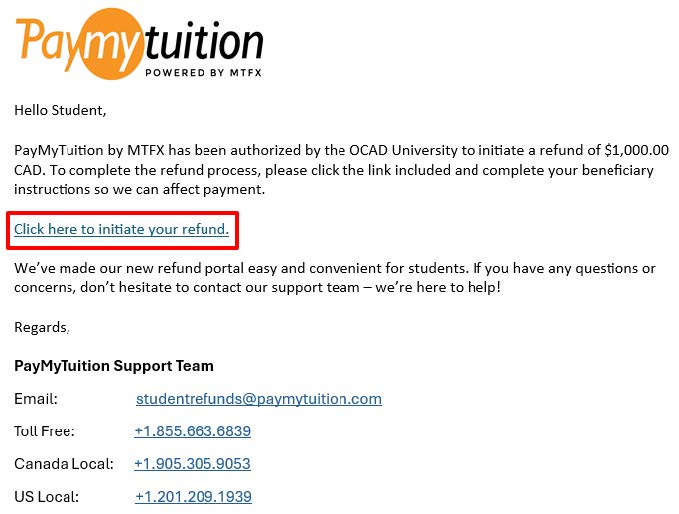
2\. You may choose to deposit the funds into someone else’s bank account. When you are directed to the PayMyTuition refund form, you will have the option within the Beneficiary Information tab to select someone else as the recipient and input their bank information.
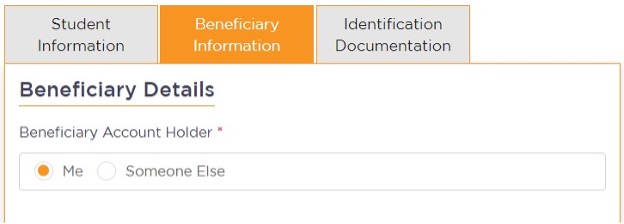
**a. Enter beneficiary details:** Complete the online refund beneficiary instruction form, which requires currency, identification documentation (either passport or driver’s license), banking and beneficiary information.
**b. Complete verification:** Upon receipt of your completed beneficiary instructions, PayMyTuition will verify your request for accuracy. They will complete fraud and compliance checks to comply with various anti-money laundering and compliance laws.
**c. Payment confirmation:** PayMyTuition will send you a confirmation email once your beneficiary information has been verified and approved. You will receive a PDF summary that is password protected. This PDF can be accessed using the bank account number that you provided in Step 2 a. as the password.
**d. Refund processed:** Once your refund has been processed, you will receive a notification that your refund is complete. Please allow 3 to 5 business days for the payment to be deposited to your account.
If you need support with the PayMyTuition refund tool, please contact [**support@paymytuition.com**](mailto:support@paymytuition.com) or use one of their [**local contact numbers**](https://www.paymytuition.com/company/contact/ "https://www.paymytuition.com/company/contact/").
### Non-refundable costs
The following fees are non-refundable and/or non-transferable to other terms, programs or students:
- Tuition deposit, International – $2,000
- Credit card (Visa, Mastercard or American Express), Visa debit or Mastercard debit convenience fee of 2.5%\*
- Payment plan setup fee – $50 or $100
\*Credit card convenience fees will not be refunded unless there has been a web payment error, such as a duplicate payment.
If you experienced a web payment error, submit a [ticket with OCAD U.](https://ocadu.topdesk.net/tas/public/ssp/content/serviceflow?unid=975bf2906b4b45359aed8e830c420edc&from=ab074d7f-aa5d-48ef-8752-4c8d28a06fc5&openedFromService=true)

rgb(255,255,255)
### **Study Permit Denial Refund**
International applicants whose study permit is refused by Immigration, Refugees and Citizenship Canada (IRCC) may be eligible for a refund of their admission confirmation deposit. The $250 administration fee included in the deposit is non-refundable.
### Undergraduate (BA, BDes, BFA) and Graduate (MA, MDes, MFA) Degree Programs
International applicants requesting a refund of their tuition deposit must submit a copy of their IRCC refusal letter to [admissions@ocadu.ca](mailto:admissions@ocadu.ca "mailto:admissions@ocadu.ca"). You must drop (withdraw from) all of your classes before submitting.
### Keeping funds on your Student Financials account
If your study permit has been refused, you have the option to have your funds/payment remain your account for a future application or while you reapply for your study permit. To do this, contact and attach a copy of your IRCC refusal letter. Please mention in the details section that you want to keep the funds in your OCAD U Student Financials account.
### International applicants may defer admission if experiencing study permit delays
If you are an international applicant and your study permit processing is delayed, you may request to defer your admission to a future term. Deferral requests must include proof of delayed study permit processing for consideration.
Contact to learn more about admission deferrals, including timelines and eligibility.
### What if my study permit application was denied?
If your study permit was denied and you're resubmitting your application, you will need a new PAL. Please contact with a copy of the IRCC refusal letter to request a new PAL.